iPhone Games With Gamepad Support: Console-Quality 2026

Photo by Daniel Romero on Unsplash
iPhone Games With Gamepad Support: Console-Quality Mobile Gaming
Playing an iPhone game with a proper gamepad in your hands changes everything. The screen becomes a window into a real arcade cabinet or a home console from the ’80s and ’90s — not a touch-screen compromise. MFi (Made for iPhone) controller support unlocks a different class of game design: precision movement, real-time combat, and mechanics that demand more than tap-and-swipe reflexes.
This guide covers the iPhone games that actually justify plugging in a controller — titles where gamepad support isn’t a checkbox feature but a design choice that makes the game sing.
Why Gamepad Support Matters on iPhone
MFi controller support isn’t about turning an iPhone into a Switch. It’s about unlocking game designs that simply don’t work well on a touchscreen. Analog sticks give you continuous movement in multiple directions — not the discrete tap-and-hold gestures that dominate mobile gaming. Pressure-sensitive buttons let developers reward subtle input variations. Haptic feedback (on supported controllers) closes the gap between your thumb and what’s happening on screen.
The result: games that feel designed rather than adapted. A twin-stick arcade game on a gamepad plays like it was meant to. A precision platformer becomes playable. Real-time combat stops feeling like you’re fighting the interface.
Most importantly, gamepad-native games on iPhone tend to be premium-tier, one-time purchases with no ads, no energy timers, and no “come back in 4 hours” friction. If a developer bothers to implement MFi support, they’ve already committed to a different business model.
Premium Arcade Games With Gamepad Support
The clearest case for a controller is arcade-lineage design: games that trace back to 1979–1985 cabinet formats and respect the lineage.
Twin-Stick Arcade
Asteroids: Recharged is the template. It takes the 1979 arcade original — rotate, thrust, shoot — and adds modern visual polish without breaking the core loop. With a gamepad, the dual-stick control scheme (left stick for rotation, right stick for thrust, or vice versa) feels immediate and precise. The game rewards patient positioning and arc prediction over reflexes alone, and a controller makes that precision tangible in a way touch controls can’t match.
The vector-art aesthetic keeps frame rates rock-solid, and the wave progression respects the original’s escalation curve. This is a game that feels like an arcade cabinet, not a mobile interpretation.
Space Combat & Orbital Mechanics
Galaximus approaches space differently. Rather than arcade abstractions, it uses real orbital mechanics — Kepler’s laws, gravitational assists, momentum conservation. A gamepad is essential here because the game rewards patient positioning and trajectory planning. You’re not twitching through waves; you’re solving physics puzzles under fire. The analog stick gives you fine control over your ship’s heading and thrust, and the game’s difficulty curve assumes that precision.
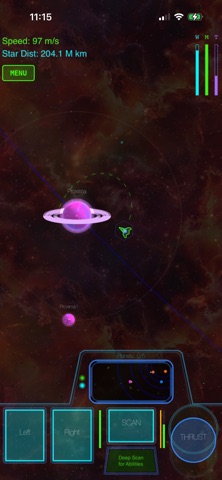
Offline play, no ads, no IAP. Pure premium design.
Minimalist Arcade Variants
Story-Driven Games With Native Controller Support
Not every gamepad-supported iPhone game is arcade-focused. Narrative adventures and action games benefit enormously from controller design.
Adventure & Exploration
Stray is a full 3D adventure — you play as a cat navigating a cyberpunk city. It’s a port of the multi-platform indie hit, and the iPhone version maintains the same gamepad-native design. The analog stick controls movement and camera, buttons handle interaction and traversal. The game was built for controller input, so every animation, every camera angle, every interaction assumes a gamepad in your hands. Touch-only play is possible but feels like a compromise.
The narrative unfolds over 4-6 hours of exploration and puzzle-solving. A controller makes those longer sessions comfortable.
Action-Adventure & Combat
Hades brought roguelike depth to mobile. The controller-optimized menu system (cursor-based, not touch-tap) makes build-crafting during runs feel less tedious. Real-time combat with a gamepad is tighter: dash-attacks, weapon switching, and ability timing all respond to button presses rather than screen taps. The game is playable on touch, but controller support unlocks the full mechanical depth.
What to Look for in a Gamepad-Supported iPhone Game
Not every game with “MFi support” is worth the controller investment. Here’s what separates genuinely controller-native design from checkbox implementations:
Button mapping clarity. Good gamepad games map controls intuitively — left stick for movement, right stick for aiming, face buttons for actions. If the game requires remapping or the controls feel arbitrary, the developer didn’t prioritize controller design.
Continuous analog input. Games that treat the analog stick as a digital direction pad (up/down/left/right) are touch-game ports. Real controller games use the stick’s full range of motion for speed, angle, or intensity. That’s where the precision lives.
Haptic feedback. Supported controllers (like the Xbox Core Controller with iOS support) can send rumble and haptic cues back to your hands. Games that implement this — collision feedback, weapon recoil, environmental vibration — feel substantially more immersive.
Menu navigation. If you’re fighting the menu system with a cursor or tap-to-select design, the game wasn’t built for controllers. Premium gamepad games let you navigate menus, adjust settings, and manage inventory entirely with buttons.
Offline play. Most gamepad-supported games on iPhone are premium-tier (no ads, no IAP), which usually means offline play. Confirm this before buying — a game that requires internet for single-player defeats the point of a portable console.
Controller Compatibility & Setup
MFi (Made for iPhone) is the standard. Any controller labeled MFi-certified will pair with an iPhone running iOS 14.3 or later via Bluetooth. Popular options include:
- Xbox Core Controller (works with iPhone via a firmware update; widely available)
- PlayStation DualSense (native iOS support, haptic feedback)
- SteelSeries Nimbus+ (MFi-certified, designed for Apple products)
- 8BitDo controllers (various models, MFi support via firmware)
Pairing is straightforward: go to Settings > Bluetooth, put the controller in pairing mode, and select it from the device list. Most games auto-detect the controller on launch.
Latency is negligible on modern controllers — no perceptible input lag. Wireless range is solid (30+ feet in clear conditions), and battery life on most controllers is 20-40 hours per charge.
Offline Play & Portability
The gamepad-supported games listed here are premium-tier, which means most are fully playable offline. No internet check-ins, no cloud saves required, no “come back tomorrow” timers. Download them once, and you can play on a plane, in a car, or anywhere without signal.
For longer trips, consider a portable stand or clip to mount your iPhone on the controller itself. This transforms the setup into something that looks and feels like a proper handheld console — which is partly the point.
FAQ
Do I need a specific controller for iPhone games? Any MFi-certified controller works. Xbox, PlayStation, and 8BitDo controllers all pair reliably. Choose based on ergonomics and price; the games don’t require a specific brand.
Will gamepad support drain my battery faster? Bluetooth adds minimal overhead. A typical gaming session with a wireless controller drains your iPhone battery at roughly the same rate as playing without one. The controller itself will need charging every 20-40 hours depending on the model.
Can I play these games without a controller? Most have touch-only alternatives, but they’re compromises. Games like Asteroids: Recharged and Galaximus are designed for analog stick precision; playing on touch loses that tactile feedback and fine control. Story games like Stray work on touch but feel less immediate.
Are gamepad-supported iPhone games more expensive? Not necessarily. They tend to be premium-tier (one-time purchase, no ads, no IAP), which means mid-tier to premium pricing. But that’s a reflection of their design philosophy, not a gamepad tax. Most cost between budget-friendly and mid-tier.
Which games have the best controller implementation? Asteroids: Recharged, Galaximus, Stray, and Hades all prioritize controller design. Their menus, controls, and haptic feedback assume a gamepad. These are good benchmarks for what “native controller support” actually means.
The Payoff
Plugging in a gamepad transforms iPhone gaming. You’re no longer fighting a touchscreen interface; you’re holding a controller that responds to your input with precision and immediacy. The games designed for this — arcade-lineage titles, narrative adventures, roguelikes with real-time combat — play like they were meant to be played.
If you’ve been skeptical about mobile gaming or felt constrained by touch controls, gamepad-supported iPhone games are worth a second look. They’re the closest thing to portable console gaming that exists outside a Switch or Steam Deck, and the best ones are genuinely excellent craft.
For more on controller-compatible titles, see Premium iPhone Games with Controller Support: MFi Compatible and Best Offline Arcade Games for iPhone: Play Anywhere. If you want to explore premium games without the gamepad requirement, How to Find Premium iPhone Games Without Ads or IAP covers the broader landscape.


