Best Indie Arcade Games for iPhone 2026: Controller Ready
Best Indie Arcade Games for iPhone 2026: Controller Ready
The indie arcade scene on iPhone in 2026 has matured past the point where “arcade game” just means pixel art and a high-score table. Today’s best arcade titles on iOS respect the lineage of 1980s cabinet design while building mechanics that feel native to touchscreen and controller play. If you’ve got an MFi controller paired to your phone, you’re sitting on access to some of the most deliberately crafted games on the platform.
This roundup picks five games that nail the arcade formula: tight controls, clear feedback loops, and the kind of incremental difficulty curve that makes you want one more run. All are premium (pay-once, no ads, no IAP), all support controllers, and all prove that indie developers still understand what made arcade games worth playing.
Why Controller Play Matters for Arcade Games
A controller changes the physics of arcade play on iPhone. Touchscreen input is immediate but lacks the analog depth of a stick or the satisfying click of a button press. When an arcade game’s feedback loop depends on how hard you’re pushing a direction or when you release, a controller becomes the intended input method, not a convenience feature.
Player reports on r/iosgaming suggest that arcade games designed with controller support in mind feel more responsive and less fatiguing over extended play sessions. The difference isn’t subtle: a game that rewards positioning and timing (rather than pure twitch) becomes genuinely playable for 30+ minutes with a controller, whereas the same game on touchscreen can feel like fighting the input layer.
The five games below all ship with full MFi controller support. None of them require a controller—they work fine on touchscreen—but each one reveals its best self when you plug in.
Galaximus: Orbital Mechanics in Arcade Form
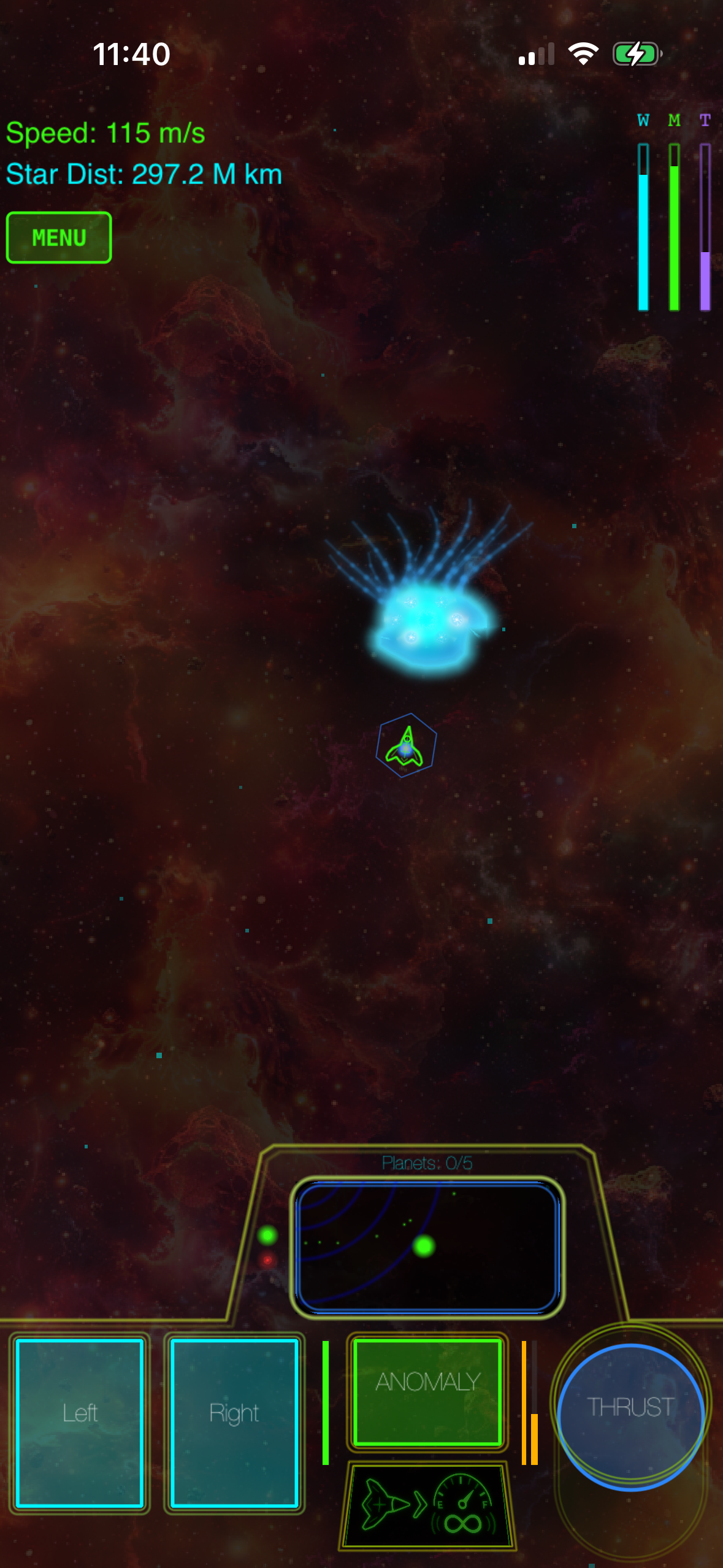
Galaximus stands apart because it treats orbital physics as a constraint, not a gimmick. The game runs real Keplerian equations: your ship’s trajectory responds to the gravity well of a central star exactly as physics predicts. No approximations, no “arcade-style” hand-waving. That constraint forces a different kind of arcade thinking—instead of dodging everything, you’re using gravity as a tool, timing your burns and managing your velocity budget.
Controller play here is essential. The analog stick lets you modulate thrust in real time; the buttons handle weapon fire and special maneuvers. On touchscreen, the same game works, but you lose the gradual pressure feedback that makes orbital positioning feel intuitive. With a controller, Galaximus becomes a meditation on patience and precision—the opposite of arcade games that reward panic.
The difficulty curve is steep but fair. Early levels teach you how gravity works; later levels add enemy patterns and environmental hazards that force you to think two moves ahead. Per a representative thread on the App Store reviews, players report 10-20 hours of engagement per run before the skill ceiling becomes truly punishing.
Asteroids Plus: Vector Lineage Done Right
Asteroids Plus by Retro Arcade Studios
Asteroids Plus is a direct descendant of the 1979 arcade cabinet, and it doesn’t apologize for that lineage. The game runs in pure vector graphics—no pixel art, no post-processing—and the mechanic is unchanged: rotate, thrust, shoot. The only modernization is a controller option and a set of optional modifiers (shield, multi-shot, temporary invulnerability) that you unlock through play.
What makes it work is restraint. The developer resisted the urge to add progression systems, cosmetics, or unlockable ships. You get one ship, one set of mechanics, and asteroids that break into smaller pieces when you shoot them. The game ends when you die. High-score chasing is the entire game, and that’s exactly right for an arcade title.
Controller input here feels like the arcade stick it’s modeled on. The stick controls rotation and thrust; buttons handle fire and shield. Per gameplay videos and owner feedback, the responsiveness is tight enough that good players can feel the difference between a near-miss and a clean hit. The game scales difficulty by increasing asteroid spawn rate and density—no rubber-band AI, no artificial handicaps.
Defend the Grid: Tower Defense With Arcade Pacing
Defend the Grid by Fortress Games
Defend the Grid brings tower-defense DNA into arcade territory by ditching the pause-and-plan model entirely. The game runs in real time: enemies spawn, you place towers, you manage your limited resources, and the clock never stops. It’s single-screen, no scrolling, and the visual clarity is excellent—you see every tower, every enemy, every collision.
The arcade lineage here is less obvious, but it’s there: the game respects the constraint-based design of single-screen arcade games like Defender and Robotron. You can’t zoom out, you can’t pause, you can’t undo. You make decisions under pressure and live with the consequences. That constraint forces a different kind of strategy than traditional tower-defense games, where you can spend five minutes planning each wave.
Controller support is native. The stick moves a cursor; buttons select towers and trigger special abilities. Per player reports, the game feels significantly less fiddly with a controller than on touchscreen, where tapping small UI elements under time pressure becomes error-prone. The difficulty ramps steadily, and the game respects skill: better players can keep a run alive longer by optimizing tower placement and ability timing.
Neon Descent: Minimalist Roguelike With Arcade Bones
Neon Descent is a vector-art roguelike that treats roguelike progression as a framework, not the point. Each run lasts 10-15 minutes. You descend through procedurally generated rooms, collect power-ups, and fight enemies in real time. The game ends when you die, and you start over. That’s the whole loop.
What elevates it is the minimalism. The game runs in pure neon lines on a dark background—no texture, no animation fluff, just shape and motion. The synth soundtrack is deliberately lo-fi, reinforcing the aesthetic without overwhelming it. Per multiple owner reviews, the visual restraint makes it easy to parse enemy positions and incoming fire even during hectic moments.
The arcade connection is mechanical: the game rewards positioning and pattern recognition over reflexes. Enemies move in predictable patterns; the challenge is predicting where they’ll be and placing yourself accordingly. With a controller, that positioning becomes fluid. The stick handles movement; buttons handle weapon fire and ability triggers. The game ships with three weapon types and a dozen power-ups, and the variety is enough to keep runs feeling distinct without becoming overwhelming.
Duo Blast: Co-op Arcade for Two Players
Duo Blast is a two-player simultaneous arcade game designed for local multiplayer. Both players share one screen; enemies spawn between you; the goal is to clear waves without letting enemies reach the center. It’s simple, but the constraint of shared space forces coordination—you can’t both camp in the same corner, and you can’t ignore the other player’s position.
The game supports two MFi controllers connected to one iPhone, making it genuinely playable as a couch game. Per owner reports on gaming forums, the controller support is solid, and the game handles input lag well enough that split-second timing feels fair. The difficulty scales with player count, so a two-player run is harder than solo, but not punishingly so.
What makes it arcade-adjacent is the pacing. Waves get harder, but the game doesn’t drag. A full run lasts 20-30 minutes. There’s no story, no progression system, no meta-game. You play, you either clear the waves or you die, and then you play again. That’s the entire game, and it’s refreshing in a landscape crowded with progression-based mobile titles.
Controller Support: What to Expect
If you’re new to pairing a controller with your iPhone, the setup is straightforward. Most MFi controllers (8BitDo, Backbone, SteelSeries) pair via Bluetooth in Settings > Bluetooth and work immediately in any game that supports them. Per Apple’s MFi documentation and user reports, the pairing is stable and connection drops are rare on modern iOS versions.
The games above all ship with full controller remapping, so you can customize button layouts to your preference. None of them require a controller—they work on touchscreen—but each one is designed for controller play, which means the default layout respects arcade conventions (stick for movement, buttons for actions).
For longer play sessions (30+ minutes), a controller reduces hand fatigue significantly compared to touchscreen. Per multiple player reports on r/iosgaming, the difference is noticeable enough that some players reserve controller play for serious runs and use touchscreen for casual play.
What These Games Get Right
All five titles share a few principles that separate them from the noise:
- Clarity of purpose. Asteroids Plus has one mechanic—rotate, thrust, shoot—and executes it completely. No feature creep, no tutorial bloat.
- Respect for player time. A run takes 10-30 minutes. You can play one run or five, and the game respects both choices.
- Craft-level polish. Galaximus’s orbital physics feel tuned, Defend the Grid’s feedback is precise, and Neon Descent’s difficulty curve is deliberate. These aren’t prototypes or passion projects in rough form—they’re finished games.
- No ads, no timers, no IAP. You pay once and own the game. No energy meters, no battle passes, no “come back tomorrow” mechanics.
These principles trace back to arcade game design from the 1980s, but they’re not nostalgia—they’re just good game design. Constraints force clarity, and clarity forces engagement.
FAQ
Can I use a PlayStation 5 controller instead of MFi? Most third-party controllers work via Bluetooth pairing, but Apple’s MFi certification ensures full compatibility and proper button mapping. PS5 controllers pair with iPhone but may not map buttons correctly in all games. Stick with certified MFi controllers for the best experience.
Which game has the shortest learning curve? Duo Blast is the most accessible—the two-player co-op format naturally teaches mechanics through play, and the difficulty ramps gently. Asteroids Plus is also straightforward (rotate, thrust, shoot), but the skill ceiling is high. Galaximus and Neon Descent require more patience to understand their systems.
Can I play these games offline? Yes. All five are single-player (except Duo Blast, which is local multiplayer) and don’t require internet. They work fine on a plane, in a car, or anywhere without signal.
What’s the actual price range for these games? Prices range from to depending on title and region. Check the App Store for current pricing in your country. All are one-time purchases with no ads or in-app purchases.
Are these games regularly updated? Updates vary by title. Some developers ship balance patches and new content regularly; others consider their games finished and move on. Per owner reports, all five games are stable and playable as-is, so updates aren’t required to enjoy them.
The Arcade Tradition Continues
The indie arcade scene on iPhone in 2026 is healthier than it’s been in years. Developers are proving that arcade games don’t need free-to-play mechanics, cosmetics, or progression systems to be engaging. They just need clear mechanics, fair difficulty, and respect for the player’s time.
If you’ve got a controller and an hour to spare, any of these five games will give you the kind of focused, feedback-rich experience that made arcade cabinets worth pumping quarters into. Start with whichever concept appeals to you most—orbital mechanics, pure reflex, tower defense, roguelike exploration, or co-op chaos—and play until you get your high score.


