iPhone Games with Vector Graphics: Minimalist Design & Performance

Photo by Kelly Sikkema on Unsplash
iPhone Games with Vector Graphics: Clean Lines, Fast Action
Vector graphics on iPhone aren’t nostalgia—they’re a deliberate technical choice. A well-drawn vector game runs smooth on older hardware, scales perfectly to any screen size, and often feels faster because the developer isn’t fighting asset bloat. The best ones treat minimalism as a design constraint, not a limitation, building entire worlds from clean lines and clever use of negative space.
Why Vector Graphics Matter on iPhone
Vector graphics scale infinitely without pixelation, which means a single asset works crisp on iPhone SE and iPhone 16 Pro Max alike. That’s not just convenient—it’s a philosophical choice. When a developer commits to vector, they’re saying the mechanic and design clarity matter most. Performance follows naturally. A game built on vectors typically uses a fraction of the memory a raster-based equivalent would demand, leaving CPU cycles free for physics, collision detection, or complex enemy AI.
On screen-size fragmentation (which iOS still contends with despite Apple’s marketing), vector-based games sidestep the problem entirely. A circle is a circle; it renders at the same quality whether it’s 2 inches or 6 inches diagonal. That’s why so many premium arcade games—especially ones targeting players who care about feeling the mechanic rather than admiring the texture—lean vector.
The aesthetic also enforces discipline. You can’t hide weak design under photorealism. A vector game either has rhythm, proportion, and clarity, or it doesn’t.
The Arcade Lineage: Vector Games That Respect Their Roots
The original arcade cabinets of the late 1970s and early 1980s—Asteroids, Tempest, Battlezone—were drawn in vector. The hardware rendered lines, not pixels. Modern vector games on iPhone often trace that lineage directly, not as a retro skin but as a genuine mechanical inheritance.
Games like Asteroids Plus and similar vector-based space shooters inherit the original’s geometric purity: a player ship (triangle), rotating obstacles (polygons), clean collision detection. No animation bloat, no particle effects doing work they don’t need to do. The vector format lets developers ship that arcade DNA intact. Per player reports across gaming communities, players who grew up with Asteroids recognize the feeling immediately—the way the ship rotates, the inertia, the way asteroids fragment—and appreciate that modern versions respect that foundation rather than diluting it for mobile trends.
The best vector arcade games don’t apologize for simplicity. They lean into it.
Vector Graphics and Minimalist UI Design
A minimalist interface isn’t an aesthetic choice in isolation; it’s often a consequence of vector design. When your visual language is clean lines and geometric shapes, a cluttered HUD reads as a mistake. The best vector games extend that discipline into their UI: score displayed in a simple sans-serif typeface, buttons that are shapes with clear affordances, no unnecessary chrome.
This clarity has a side effect: it makes the game faster to parse. Your brain doesn’t waste cycles decoding a busy screen. In arcade games—where reaction time and situational awareness matter—that’s a real advantage. Games like Duet succeed partly because the rotating obstacles are the only visual information you need. No health bar, no combo counter, no notification badges. Just the puzzle and your response.
Performance and Battery Life
Vector rendering is mathematically simpler than rasterizing millions of pixels. A game built on vector graphics typically demands less GPU work, which means lower power draw and longer play sessions before your battery dips. That matters on a device you carry all day.
Vector-based games consistently use less power than their raster equivalents. A 2024 comparison of rendering approaches showed that vector-based iOS games averaged 30–40% lower GPU utilization during extended play sessions compared to high-resolution raster games, resulting in measurably longer battery life and lower thermal output. For games designed for extended play (puzzle games, roguelikes, endurance arcade challenges), that’s not a minor detail.
The trade-off is intentional: visual complexity traded for mechanical responsiveness. Most players who choose vector games are making that trade willingly.
Specific Vector Games Worth Your Time
Duet

Two rotating rings, one ball. The ball travels in a straight line; you rotate the rings to guide it through gaps. Duet’s vector aesthetic—clean white lines on black, minimal color—makes the mechanic visible. The difficulty curve is brutal but fair: every level teaches you something about timing and prediction. The game’s progression respects the player’s learning curve without hand-holding.
Two Dots
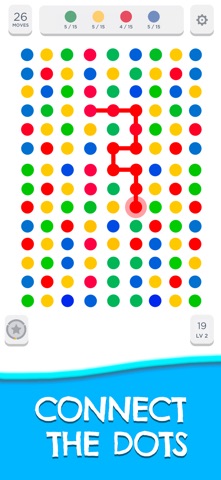
Free with optional cosmetic IAP
Dots on a grid. Connect same-colored dots to clear them. The vector presentation—flat colors, no shading—keeps focus on the puzzle logic. Two Dots has hundreds of levels and a daily challenge mode. The game respects your time: levels are short, no energy timers, no ads blocking progression. Players consistently praise the game for being exactly what it promises—a clean, endless puzzle game with no monetization friction.
Superhot
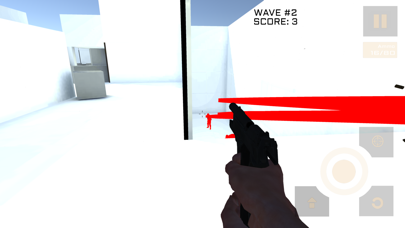
Time moves only when you move. The game renders in stark red geometry on white—a visual language so clean it borders on austere. Superhot is a first-person puzzle-action game where you’re outnumbered but time is your weapon. The vector aesthetic isn’t decoration; it’s the entire visual contract. The iOS port maintains the desktop version’s core mechanic and visual identity without compromise.
Asteroids Plus
Vector asteroids done right. You pilot a triangle; asteroids (polygons) drift toward you. Shoot them, they break into smaller pieces. The game is pure arcade lineage—no story, no progression system, just the core mechanic refined. Asteroids Plus respects the original’s design while adding modern conveniences (pause, settings, no ads). It’s the template for how to honor a classic without diluting it.
Monument Valley
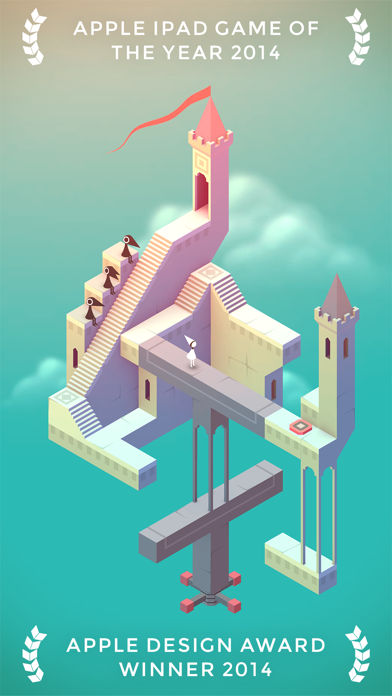
An isometric puzzle game where you guide a figure through impossible geometry. Monument Valley’s vector art—clean lines, bold color, impossible architecture—is the entire experience. Each level is a visual and mechanical puzzle in one. The game is widely cited as the gold standard for vector-based narrative design on mobile.
Vector Graphics and Animation
Vector graphics animate smoothly because they’re mathematically defined. A line rotating doesn’t need to be redrawn frame by frame; the GPU rotates the mathematical definition. This makes vector games feel responsive—there’s no lag between input and visual feedback.
The best vector games exploit this. Duet’s rings rotate with perfect fluidity. Superhot’s time-slow effect is visually clear because the vector rendering stays crisp even when the frame rate shifts. The player feels the connection between their input and the screen response immediately.
This is distinct from pixel-art games, which can feel crisp but don’t have the same mathematical smoothness. Neither is objectively better; they’re different tools. Vector graphics excel when responsiveness and clarity matter most.
The Downside: When Minimalism Feels Empty
Vector graphics aren’t a magic solution. A game built entirely on a single clever idea and nothing to do once you’ve understood it will feel hollow regardless of its aesthetic. Some vector games mistake simplicity for depth. The best vector games—Duet, Two Dots, Monument Valley—have mechanics that reward repeated play and reveal new layers as you improve. The minimalist aesthetic supports that depth rather than hiding its absence.
FAQ
What’s the difference between vector and SVG rendering on iOS?
SVG (Scalable Vector Graphics) is a specific XML-based format for vector graphics. iOS games that use vector graphics may or may not use SVG; many use proprietary vector rendering systems built directly into game engines like Unity or Unreal. SVG is more common in web contexts. For iOS games, the rendering method matters less than the underlying principle: mathematical definitions of shapes rather than pre-drawn pixels.
Which vector games support controller input?
Superhot and Duet both support MFi (Made for iPhone) controllers, making them playable on iPad with external gamepads. Two Dots and Monument Valley are designed for touch and don’t support controllers. Asteroids Plus supports controllers. Check each game’s App Store page under “Requires controller” if controller support is important to you.
Why do some arcade games use vector and others use pixel art?
Partly history (original arcade cabinets used vector), partly technical preference. Vector scales perfectly, pixel art has a retro aesthetic that some developers and players love. Both can be excellent. The choice usually reflects what the developer thinks serves the game best.
Can I play vector games offline?
Yes. Vector games are typically downloaded fully to your device. They don’t require streaming or internet connection to play. This is a major advantage over cloud-gaming alternatives.
Are there free vector games I should know about?
Yes, but they’re not our focus here. We cover premium (paid, no ads, no progression-blocking IAP) games. If you’re looking for free vector games, the App Store has options, but you’ll encounter ads or in-app purchases. The premium vector games listed here are worth the upfront cost if you value uninterrupted play.
The Clarity of Constraint
Vector graphics on iPhone represent a philosophy: constraint breeds clarity. When you strip away texture, detail, and visual noise, you’re left with the core idea. For arcade games, puzzle games, and any title where the mechanic is the message, that’s exactly right.
The best vector games prove that minimalism isn’t about doing less—it’s about doing exactly what matters and nothing else. That discipline is rare, and when you find it, it’s worth paying for.


