iPhone Games With Vector Graphics: Minimalist Paid Games

iPhone Games With Vector Graphics: Minimalist Paid Games
Vector graphics on iPhone—clean lines, no blur, infinite scale—have become the standard for indie games built around precision and readability. This guide covers premium, paid-once titles that use vector art as an intentional design choice serving both aesthetics and gameplay.
Why Vector Graphics Matter on iPhone
Vector art scales perfectly to any screen size without pixelation or blur—crucial on devices ranging from iPhone SE to iPhone Pro Max. More importantly, vector design forces clarity: every line, shape, and color choice has to earn its place. There’s nowhere to hide bloat or poor contrast.
For arcade games, vector graphics align with the medium’s core strength: readability at speed. When you’re tracking a dozen enemies and your own position simultaneously, clean geometry beats photorealism. The best vector-art games on iPhone treat simplicity as a feature, not a limitation.
Arcade Action: Vector Lineage Games
Games in this category trace back to 1980s arcade formats—Asteroids, Tempest, Defender—and respect that heritage through both mechanics and visuals.
Asteroids+ by Nora N. Games
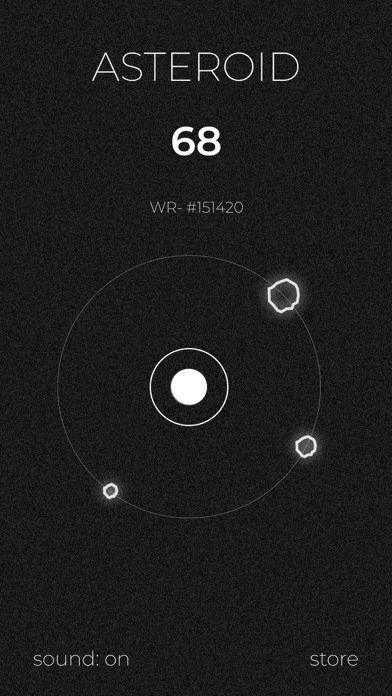
The closest modern equivalent to the 1979 arcade cabinet. Your ship rotates and thrusts in a vector-line asteroid field; you shoot to break rocks into smaller pieces. No power-ups, no special modes—just you, your positioning, and the physics. The vector art is functional: white lines on black, exactly as the original arcade, but with touch controls tuned for iPhone precision. The control responsiveness and difficulty curve keep players returning for high-score chasing.
Geometry Wars 3: Dimensions
A more modern take: vector-art geometry enemies (squares, triangles, circles) swarm around you in arenas that shift between 2D and 3D depth layers. The visual style is pure vector—bright neon lines and shapes on black—but the gameplay is less pure arcade and more “bullet-hell with a grid.” The 3D perspective shift adds tactical depth once you learn to read the depth cues. Waves of enemies, power-ups, and survival-timer modes give it more structure than raw Asteroids-lineage games.
Puzzle Games: Vector Elegance
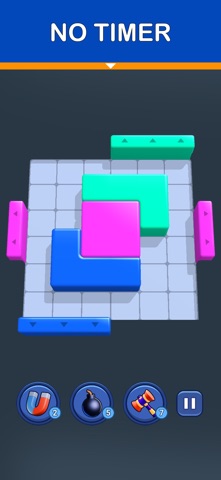
Minimalist puzzle games often lean into vector design because the format demands clarity. You need to see the rules at a glance.
Two Dots
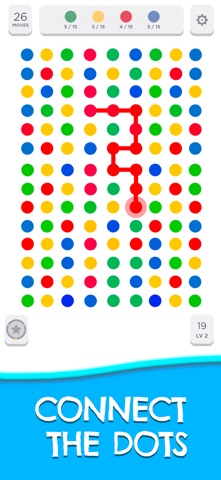
Tap adjacent dots of the same color to form a closed loop; the loop clears. The vector art—clean circles, thin connecting lines, soft colors—reinforces the meditative pacing. No timer, no pressure, just you and the grid. The game has no ads, no IAP, no energy system. You own it outright. Available on iOS 11+.
Threes!
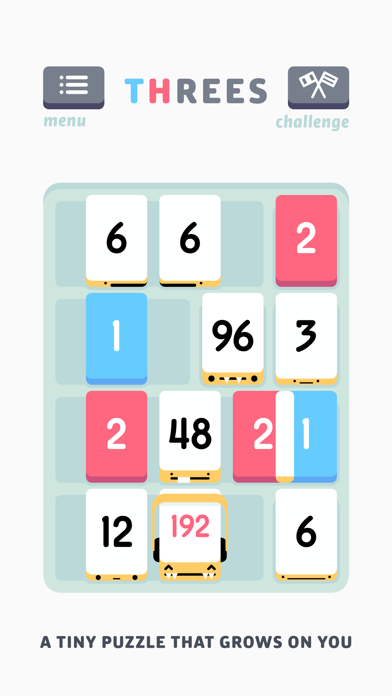
Slide numbered tiles on a 4×4 grid; combine matching numbers (1+1=2, 2+2=4, etc.) to reach 3 and beyond. The vector UI is minimal—clean typography, soft colors, clear tile borders—but the real elegance is in the rule design. Every tile move has weight. The game rewards patience and long-term planning over reflexive swiping. You buy it, you own it, you play it as much as you want. Available on iOS 12+.
Mini Metro
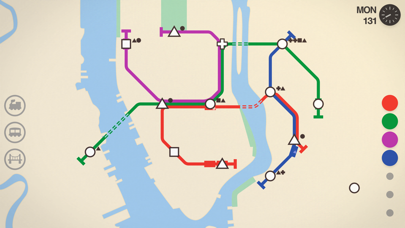
Draw subway lines to connect dots (stations) on a minimal vector map. Stations appear randomly; you draw lines to link them, but lines can’t cross. As time passes, more stations appear and your network grows more complex. The vector aesthetic is essential here—simple dots, clean lines, no visual clutter—because your cognitive load is already high. The game’s appeal lies in calm-but-challenging pacing: you’re solving a real spatial puzzle, but the vector-line interface keeps it feeling like meditation rather than stress. Available on iOS 10+.
Why Minimalism Isn’t Just Aesthetics
Games using vector graphics often do so because the constraint forces better design. When you can’t rely on texture, particle effects, or detailed sprites to convey information, every element has to be intentional.
Readability at speed. In arcade games, you’re tracking movement, collisions, and your own position. Busy visuals—gradients, shadows, overlapping sprites—slow your brain down. Vector lines and flat colors let you process the play-space faster.
Scaling across devices. Vector assets render crisply across iPhone models. A developer building for a dozen different screen sizes doesn’t have to ship a dozen sprite sheets; one vector file scales infinitely.
Timeless design. Photorealistic graphics age badly. Vector art from 2015 looks the same today. Games like Asteroids (1979) and Tempest (1981) still look sharp on modern screens because their vector lineage translates directly to modern vector rendering.
Performance and Battery Life
Vector rendering is computationally lighter than rasterized sprites or 3D meshes. Games built with vector art tend to run cooler and drain battery slower, even on older iPhones. Vector games can sustain 60 fps on iPhone hardware going back several generations without thermal throttling.
For players who use their iPhone for work and gaming both, a game that doesn’t cook your battery is a meaningful advantage.
The Paid-Game Advantage
Every game mentioned here is premium: one-time purchase, no ads, no in-app purchases, no energy timers. The vector-art games that succeed on the App Store tend to be premium because the design philosophy aligns: if you’re stripping away visual noise, you’re also stripping away the dark-pattern UI that free-to-play games rely on.
You’re not funding the game through ads or psychological pressure to spend. You’re funding it through a fair price for a finished product. That alignment—minimalist design + honest monetization—is why vector-art premium games feel so different from the free-to-play crop.
FAQ
What’s the cheapest vector game on this list? Threes! at. Two Dots, Asteroids+, and Mini Metro are all. Geometry Wars 3 is the most expensive at.
Do these games work offline? Yes. All five titles work without an internet connection. Once downloaded, you can play anywhere.
Do vector games run better on older iPhones? Generally yes. Vector rendering is less computationally expensive than rasterized sprites or 3D meshes. Games built with vector art tend to sustain high frame rates and lower thermal load. If you’re playing on an iPhone 11 or older, vector-art games are a safe bet for smooth performance.
Why are so many premium iPhone games vector-based? Indie developers often choose vector art intentionally because it forces clarity and scales perfectly across iPhone screen sizes. It’s also the natural aesthetic of arcade-era games, which dominate the premium iPhone game space. Free-to-play games lean on visual spectacle to distract from monetization; premium games lean on elegant design.
Can I find vector-art games in other genres besides arcade and puzzle? Yes, but arcade and puzzle dominate. Vector art works well for any game where readability and speed are priorities. Some vector-art games exist in strategy, adventure, and platformer spaces, but they’re rarer.
What’s the difference between vector art and pixel art on iPhone? Vector art scales infinitely without blur; pixel art is fixed resolution and can look blocky on high-DPI screens unless scaled up in multiples. Both are legitimate retro aesthetics. Vector art is more flexible across screen sizes; pixel art is more nostalgic and requires intentional design to look sharp on modern phones.
Summary
Vector-art games on iPhone represent a philosophy: design clarity, honest monetization, and respect for the player’s time. The best ones—Asteroids+, Two Dots, Mini Metro, Threes!, Geometry Wars 3—use minimalist visuals not as a budget constraint but as a design choice that serves both aesthetics and gameplay.
If you’re tired of free-to-play energy timers and ad breaks, vector-art premium games are a direct antidote. They’re also some of the most readable, battery-friendly, and enduring games on the App Store. Buy once, play forever, no regrets.


