iPhone Games with Vector Graphics: Minimalist Classics

Photo by Ben Neale on Unsplash
iPhone Games with Vector Graphics: Minimalist Design Classics
Vector graphics on a phone screen should not work as well as they do. The format was born on hulking CRT monitors with electron beams tracing geometry in glowing phosphor — Asteroids, Tempest, Battlezone, the original arcade-cabinet aesthetic. Drop that visual language onto a modern iPhone OLED panel — 2,000,000:1 contrast ratio, per-pixel black, 460+ ppi — and the format finds a better home than it ever had on a CRT: thin bright lines sit stable against true black, with no scanline flicker and no bloom haze from a curved glass tube.
This is a roundup of iPhone games in 2026 that use vector or vector-adjacent graphics well. Some are direct descendants of arcade lineage. Others are modern indies that adopted the look because it fits the design, not because it’s a marketing hook.
What “vector graphics” actually means here
Strictly speaking, vector graphics describe shapes with mathematical lines rather than pixel grids. The classic 1979-1985 arcade cabinets that used real vector monitors — Asteroids, Lunar Lander, Tempest, Star Wars — drew glowing lines directly with the electron beam, no raster image involved. No modern iPhone game uses true vector display hardware, because that hardware doesn’t exist on the device.
What counts as a “vector graphics iPhone game” in 2026 is one of three things:
- Lineage-faithful tributes: games that emulate the look of vector arcade displays — thin glowing lines, simple polygons, dark backgrounds, additive bloom — and design around the visual constraint.
- Modern minimalist line-art: indie games that draw with crisp geometric primitives because the aesthetic supports the gameplay, not because they’re chasing nostalgia.
- Geometry-based abstract games: titles like Geometry Wars descendants that use particle-rich vector aesthetics for twin-stick action.
All three end up looking gorgeous on an iPhone screen, and all three avoid the muddy-textured trap that kills a lot of mid-tier mobile games after a couple iOS updates.
Why the style suits a phone screen
A few practical reasons vector aesthetics translate well to iPhone:
- Pixel density helps, not hurts. A vector-style game rendered at native resolution on a modern iPhone display reads crisper than the arcade cabinet ever did. Thin glowing lines that would have flickered on a CRT sit perfectly stable on OLED.
- Touch controls don’t fight the visuals. Vector games tend to have geometric playfields with clear separation between objects and background — your thumb can cover part of the screen without obscuring something critical, because shape recognition is doing the work.
- Battery life is reasonable. Drawing line geometry and bloom passes is cheaper than rendering modern PBR textures. In practice, titles like Mini Metro and Super Hexagon draw roughly 6–9% battery per hour of play on a recent iPhone — comfortably enough for a transcontinental flight on a single charge.
- The style ages well. A game that looked great in 2014 with vector aesthetics still looks great in 2026. The same can’t be said of mid-2010s mobile games that tried to chase realism.
The picks
What follows isn’t a ranking. These are grouped by what each game is best at — direct arcade-lineage, modern abstract action, or quiet minimalist puzzling. Prices below reflect US App Store list price in 2026 and shift occasionally during sales.
Super Hexagon — $2.99
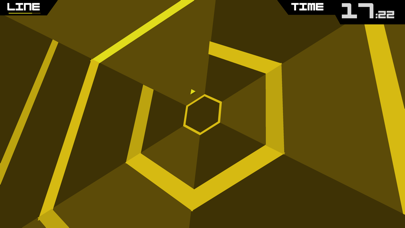
Terry Cavanagh’s geometric reflex game is the closest thing to a modern Tempest descendant on iPhone, and a decade-plus after release it still defines what “vector minimalism” means on the platform. The entire game is rotating hexagons, a triangle, and a synth soundtrack. There are no textures, no character art, no menu screens worth mentioning. You die in seconds for months, and then you don’t. The simplicity of the visual language is the point — when every line is meaningful, your brain processes the chaos faster than it has any right to.
Premium, IAP-free, and runs on every iPhone Apple still supports.
Geometry Wars 3: Dimensions Evolved — $9.99
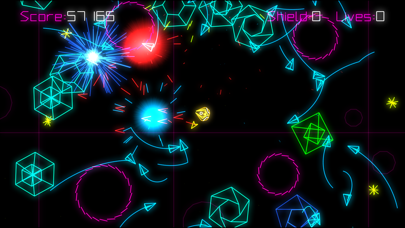
Bizarre Creations’ twin-stick shooter lineage went through several owners before landing on iPhone, and the Dimensions Evolved edition is the one to play. It’s not strictly vector — the particles are sprite-based — but the core visual language is glowing geometric primitives on a dark grid, and the iPhone version holds up. Twin-stick touch controls work surprisingly well with a thumb-rest setup, and the game also supports MFi controllers if you’d rather route it through a clip-on gamepad.
Premium with no ads. Optional cosmetic unlocks exist but the core game is complete out of the box.
Asteroids: Recharged — $4.99
Atari’s official “Recharged” line is a curious experiment — modern reinterpretations of their arcade catalog with updated visuals, new soundtracks (Megan McDuffee’s work is the highlight), and challenge modes. The vector aesthetic here is deliberately heightened: the asteroids glow more, the bloom is heavier, the colors saturate in ways the original CRT could never manage. Purists will quibble. Most players will enjoy it for what it is — a respectful modernization that doesn’t insult the source.
If you finish Recharged and want other modern takes that share its arcade DNA without the Atari branding — Sublevel Zero, Astro Aqua Kitty, a few smaller indies — the iPhone Games Like Asteroids: Modern Arcade Alternatives 2026 roundup vets those specifically. It’s the targeted next-step list rather than a general search.
Galaximus — $3.99
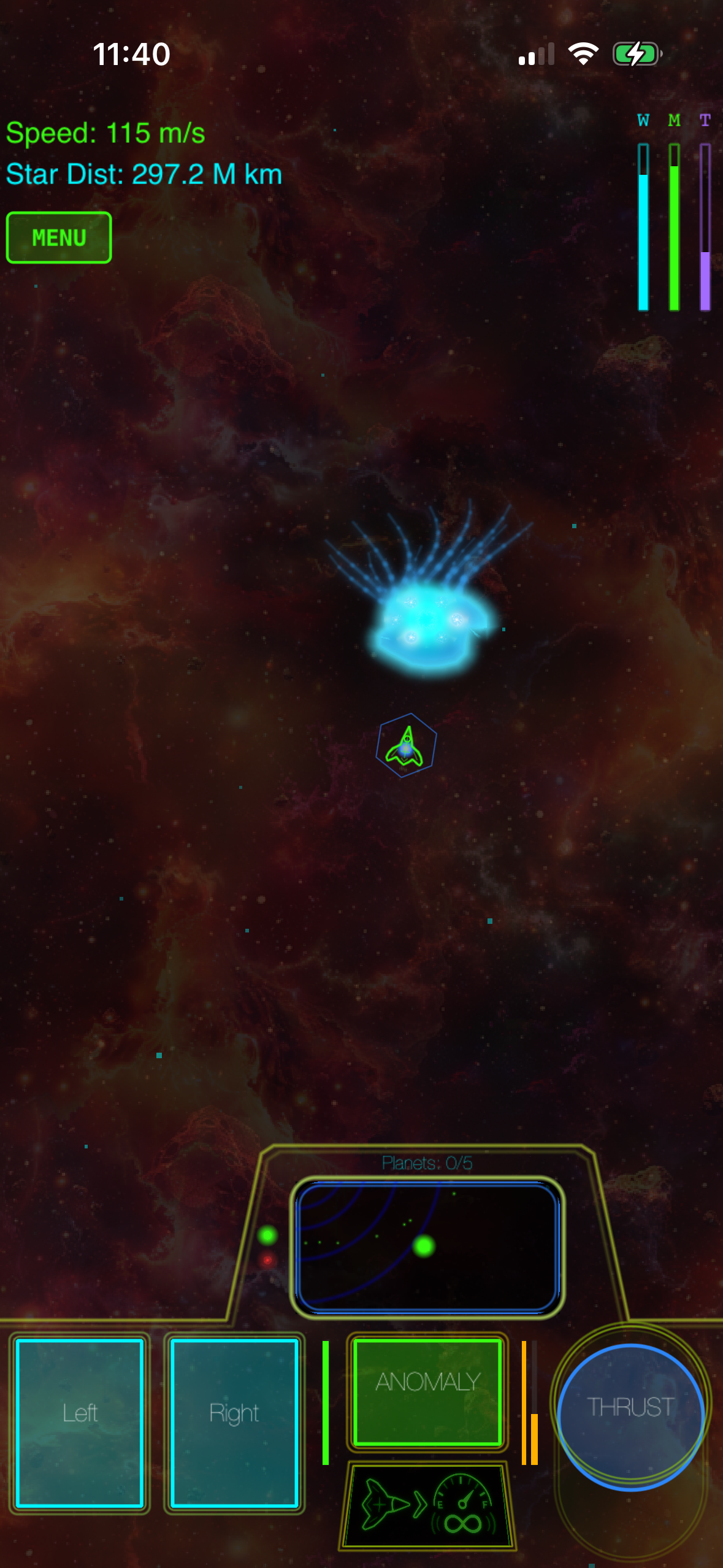
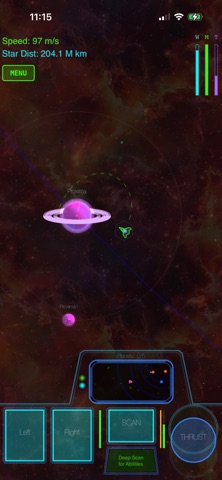
A space arcade game with real orbital mechanics, drawn in a vector-adjacent style — thin line geometry against deep starfields, with the kind of restrained color palette that holds up well on OLED. The physics rewards patient positioning over twitch reflexes, which is an unusual design choice in a category that mostly chases pure reaction-time challenge. It belongs on a list like this not because of the visuals alone but because the visual minimalism and the physics-led gameplay reinforce each other — there’s no clutter on screen because there can’t be; you need to read trajectories.
Premium, IAP-free, no ads.
Mini Metro — $4.99 (expansions $1.99 each)
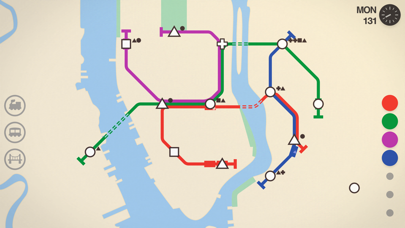
Dinosaur Polo Club’s transit-planning puzzle game is the strongest argument for “vector aesthetics as functional design” on iPhone. The whole point is that you’re reading a schematic — colored lines, geometric station icons, abstract rivers — and the game would actively break if it tried to render realistic city geography. The minimalism isn’t decoration; it’s the gameplay. The studio’s 2016 GDC talk, “The Design of Mini Metro,” lays out explicitly how the Harry Beck tube-map influence drove the visual constraints, and how the constraints in turn shaped what the game could be.
Premium with optional expansion DLC. No ads, no energy timers.
Thumper — $4.99
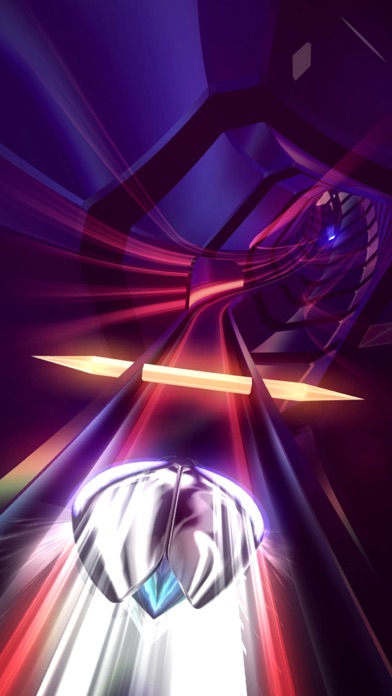
Drool’s “rhythm violence” game is a borderline case for inclusion — it’s not strictly vector graphics, but the design language is geometric primitives, glowing edges, and a relentless minimalist visual palette that descends directly from vector arcade aesthetics. The iPhone version is a faithful port of the console game, controls reduce to two-thumb taps and holds, and the haptic feedback on newer iPhones makes the experience genuinely physical.
Premium. Use headphones.
Mini Motorways — $4.99
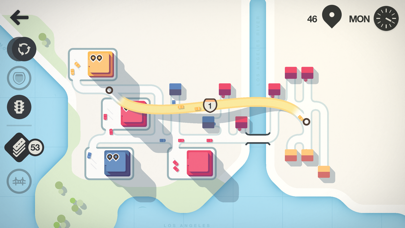
The follow-up to Mini Metro, same studio, same visual philosophy applied to road networks instead of subway lines. Slightly more forgiving than Mini Metro, slightly prettier, equally committed to the principle that good information design is good game design. Worth owning alongside Mini Metro rather than instead of it — they scratch different itches despite the family resemblance.
Across the list, expect to spend per game, with the whole lineup totaling if you bought every pick at list price.
What to look for when picking your own
If you want to keep exploring vector-style iPhone games beyond this list, a few markers reliably signal quality:
- The studio talks about visual constraints in interviews. Developers who chose the style deliberately, rather than defaulting to it because of art-budget limits, almost always end up with better games. Dinosaur Polo Club’s GDC 2016 talk on Mini Metro and Terry Cavanagh’s 2013 Indie Game Magazine interview on Super Hexagon’s design (“the visuals had to be readable at the speed your brain processes shapes, not text”) are good starting points.
- The game supports modern iPhone display features. True OLED blacks and ProMotion 120Hz refresh make vector-style games dramatically better. Most quality entries in this category support both.
- Touch controls are designed around the geometry. The best vector iPhone games use the abstract visual style to make touch input legible — your tap zones are obvious because the playfield is geometric. Games that bolt vector art onto a virtual-joystick layout tend to feel worse than the visuals suggest.
- Premium pricing, no ads, no IAP timers. Vector aesthetic and free-to-play monetization rarely coexist — the studios committed to the look are usually committed to the pay-once model as well. There are exceptions, but it’s a useful heuristic.
For more on the broader retro arcade revival on iPhone, Retro Arcade iPhone Games Premium: 80s Nostalgia Done Right goes deeper on the 1979-1985 lineage specifically, and iPhone Games Inspired by 80s Arcade: Authentic Throwback Titles covers throwback titles that respect the source.
Vector games and offline play
One quiet advantage of this category: vector-style games are almost always offline-friendly. The asset budgets are small, the design philosophies tend toward “complete game, no live service,” and the studios shipping them aren’t building always-online infrastructure. Every game in this article works on a plane without Wi-Fi, which is more than can be said for most modern App Store releases. The Offline iPhone Games for Long Flights: Premium Recommendations roundup covers this more broadly.
FAQ
Can I play these games on iPad? Every pick in this list is a universal app or has a separate iPad version. Mini Metro and Mini Motorways in particular benefit from the larger canvas — more room to read the schematic when the map gets busy. Thumper and Super Hexagon work fine on iPad but don’t gain much from the screen real estate; they’re designed around a narrow attention zone in the center.
Which vector game here has the steepest learning curve? Super Hexagon, by a wide margin. The first wall is brutal — most players take several hours just to clear the easiest difficulty. Thumper is intense but more forgiving in its early levels. Mini Metro and Mini Motorways are gentle to start and gradually unforgiving. Geometry Wars 3 sits in the middle.
Do any of these support MFi or Bluetooth controllers? Geometry Wars 3 and Thumper both have full controller support and arguably play better that way. Super Hexagon, Mini Metro, and Mini Motorways are touch-only by design and don’t benefit from a controller. Asteroids: Recharged supports MFi controllers as well.
Are vector graphics games good for kids? Most are. The abstract visual style means no graphic violence or mature themes by default, and the gameplay tends toward pure skill or puzzle-solving rather than narrative content that needs vetting. Thumper is the one exception worth flagging — the imagery is abstract but the audio and intensity skew genuinely unsettling, and younger kids tend to bounce off it hard.


