iPhone Games with Vector Graphics: Minimalist Design & Fast Action

Photo by Kelly Sikkema on Unsplash
iPhone Games with Vector Graphics: Minimalist Design & Fast Action
Vector graphics on iPhone aren’t a nostalgic affectation—they’re a design choice that rewards precision. Clean lines, sharp collision detection, and minimal visual noise create a direct line between your thumb and what happens on screen. The best vector-based games on iOS lean into that clarity: arcade action stripped to its essentials, where every pixel counts and every frame runs at 60fps without compromise.
This guide covers premium, craft-built games built on vector aesthetics—the kind that make you forget you’re holding a phone.
Why Vector Graphics Matter on iPhone
Vector-based games render shapes mathematically rather than as pre-rendered pixels. That means they scale perfectly on any screen size, run lean on the GPU, and allow developers to focus on feel rather than asset bloat.
For arcade and action games, this translates to:
- Instant visual feedback. No texture pop-in, no aliasing artifacts. A bullet is a line; it hits or it doesn’t.
- Predictable performance. Vector games run smooth on older iPhones because they don’t depend on high-resolution sprite sheets. A 2-3 year old device plays them at full frame rate.
- Intentional design. Developers who choose vector graphics are usually making a statement about clarity over spectacle. The aesthetic is the mechanic.
Vector graphics don’t mean “flat” or “boring”—they mean purposeful. Color, motion, and timing do the work that polygons and particles do elsewhere.
Arcade Lineage Games in Vector
iPhone Games Like Asteroids: Modern Takes on Classic Arcade
The clearest vector-graphics lineage runs through 1979–1985 arcade cabinets: Asteroids, Tempest, Defender, Robotron. These games used vector monitors—actual oscilloscope-style displays that drew lines directly, no raster grid. Modern vector games on iPhone often pay homage to that era, both in aesthetic and in mechanical clarity.
Games like 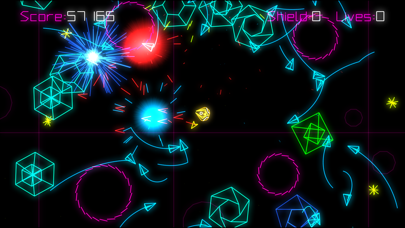 and
and 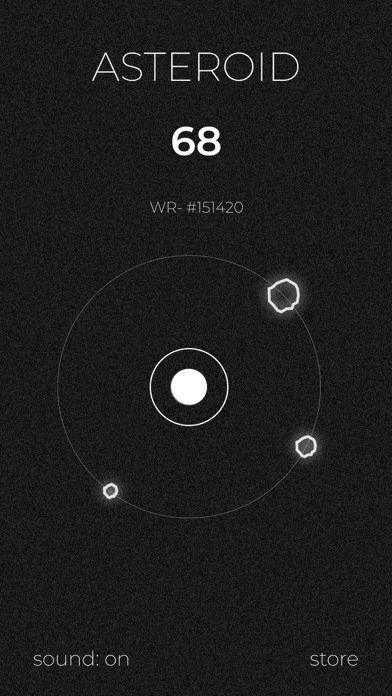 (the official Atari port) prove the formula still works. The visual simplicity creates urgency: you see the threat immediately, react immediately, and the game responds without lag.
Vector arcade games reward pattern recognition and positioning over twitch reflexes. A single well-placed shot matters more than spray-and-pray volume.
Minimalist Design & Performance
Vector graphics enable a particular kind of minimalism that’s not about being sparse—it’s about being efficient. Every visual element serves the game state.
When a game uses vector rendering:
- File size stays small. A vector-based game might be 50–200 MB total; a comparable raster game could be 500 MB or more.
- Battery drain is lower. GPU-light rendering means your phone’s processor isn’t working as hard, so your battery lasts longer during extended play sessions.
- Readability improves in bright light. High-contrast vector graphics cut through glare better than photorealistic textures.
This is why vector games are often the best choice for play on the go—on a bus, in sunlight, or when you’re burning through your battery on a long day out.
Top Vector-Graphics Games for iPhone
Best Retro Shooter Games iPhone: Paid & Ad-Free
Geometry Wars 3: Dimensions
Geometry Wars is the modern standard-bearer for vector arcade action. Neon shapes on a dark field, relentless enemy spawns, and a scoring system that rewards aggressive play. The third iteration added depth (literally—levels have a 3D quality) while keeping the core vector aesthetic intact.
The game is demanding but fair. You always know what’s on screen and where the threats are. No particle-effect spam hiding danger; no motion blur excusing sloppy collision detection. It’s pure arcade craft-building—every update to the game since launch has been about tuning feel, not adding cosmetics.
Asteroids (Official Atari)
The official Atari port of the 1979 arcade original. It’s a straight translation: vector ship, vector asteroids, vector bullets. The iPhone version runs at 60fps and feels nearly identical to the cabinet, minus the arcade cabinet’s physical feedback.
If you want to understand why vector graphics work for arcade games, play this for five minutes. The lack of visual noise means you can track five asteroids, three enemies, and your own ship position simultaneously without cognitive overload. Try that in a game with heavy particle effects and you’ll understand the difference.
Soulslinger: Envoy of Death
A top-down arcade shooter with vector aesthetics and a Western-occult theme. The minimalist visual style creates a stark, almost eerie atmosphere—you’re a lone figure in a dark landscape, firing at approaching enemies. The game uses vector rendering to keep the action readable even when multiple projectiles are in flight.
Soulslinger rewards positioning and deliberate aim over reflexes. It’s slower-paced than Geometry Wars but no less demanding of your attention.
Crossy Road: Bits
A voxel-based game (which shares vector graphics’ emphasis on clean geometry) with a chiptune soundtrack and a deliberate, turn-based pace. You guide a character across an endless landscape, dodging obstacles and collecting points.
Crossy Road: Bits is meditative compared to arcade shooters, but it’s built on the same principle: clarity and feedback. Every action you take results in immediate, unambiguous response.
Vector Graphics + Synthwave Aesthetic
iPhone Games Inspired by 80s Arcade: Nostalgia Done Right
Many vector games pair minimalist graphics with a synthwave color palette—neon pinks, cyans, and purples on dark backgrounds. This isn’t just visual appeal; it’s a design philosophy that echoes the arcade era while being distinctly modern.
Synthwave vector games include:
- Neon-heavy color schemes that reduce eye strain in dark environments and create instant visual hierarchy
- Chiptune or synth soundtracks that match the visual minimalism
- High contrast that makes collision detection visually obvious
Games like  and
and  use vector-adjacent minimalism (clean shapes, high contrast) to create a sense of urgency and precision that wouldn’t work with photorealistic graphics.
Puzzle Games in Vector
Best Arcade Puzzle Games for iPhone Premium 2026
Vector graphics aren’t just for action games. Puzzle games often benefit from the clarity that vector rendering provides.
Duet
A puzzle game where you rotate two circles around a central point, dodging incoming obstacles. The entire game is built from simple geometric shapes—circles, lines, dots—rendered in vector style.
Duet’s minimalism is essential to the design. You need to see the exact position of the obstacle and the exact angle of your circles. Any visual noise would break the game. Vector rendering gives you that clarity at 60fps, every frame.
Two Dots
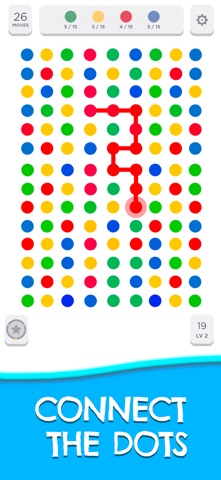
A puzzle game where you connect dots on a grid. The vector aesthetic keeps the board readable even when it’s crowded with pieces. No textures, no gradients—just colored dots and clean lines.
Two Dots proves that vector graphics work across genres. It’s not about arcade action; it’s about visual clarity enabling puzzle-solving.
Performance & Compatibility
Vector games run well on older hardware because they don’t demand high-resolution assets or complex shaders. An iPhone 11 or iPhone 12 will play vector arcade games at full frame rate without compromise. Even an iPhone XS handles them smoothly.
This matters if you have a backlog of older devices or if you’re buying a used phone. Vector games age gracefully—a vector game from 2020 will look and play identically on an iPhone 14 or an iPhone 16.
How to Find Vector-Graphics Games
When browsing the App Store, look for:
- High contrast, minimal color palette. Vector games usually favor bold colors on dark backgrounds.
- Smooth, geometric shapes. No textured surfaces or photorealistic elements.
- Mention of “arcade” or “retro” in the description. Developers building vector games often market them that way.
- Premium pricing (one-time purchase). Most craft-built vector games are paid upfront; free-to-play vector games tend to be lower effort.
Check reviews for mentions of “60fps,” “smooth,” or “responsive controls.” These are markers of games that prioritize performance and feel—the same values that drive vector-graphics design.
FAQ
Are vector graphics only for retro games?
No. Vector rendering is a technical choice, not a nostalgic one. Modern games use it because it’s efficient and precise. The retro aesthetic is optional—you can build a vector game that looks futuristic or minimalist rather than arcade-inspired.
Do vector games look dated on modern iPhones?
Not if they’re well-designed. A vector game from 2020 looks as sharp on an iPhone 16 as it did on release because vectors scale infinitely. Raster games (built from fixed-resolution sprites) often show their age faster.
Why are vector games usually cheaper than 3D games?
Asset creation is simpler. A 3D game needs high-resolution models, textures, and animation rigs. A vector game needs clean geometry and careful timing. Lower development cost doesn’t mean lower quality—it means the developer’s effort goes into mechanics and feel rather than visual spectacle.
Can I play vector games on older iPhones?
Yes. Vector games run well on iPhone 8 and later, and many run fine on iPhone 6s. Check the App Store listing for the minimum iOS version, but vector games are generally the most compatible category on the platform.
Are there free vector games worth playing?
Some. But the best vector games are premium (paid upfront, no ads, no IAP). Free-to-play vector games often compromise the design with energy timers or ad breaks, which undermines the clarity that makes vector games special.
The Case for Vector
Vector graphics on iPhone aren’t a limitation—they’re a clarity statement. In a landscape crowded with high-poly models and particle effects, a well-crafted vector game stands out because it lets you see what’s happening.
The best vector games on iOS prove that arcade-era design principles still work: clear feedback, responsive controls, and intentional visual design create engagement that doesn’t fade. Whether you’re chasing a high score in Geometry Wars or solving a puzzle in Duet, the vector aesthetic isn’t decoration—it’s the game itself.
If you’re tired of visual clutter and looking for games that reward precision over reflexes, vector graphics are where to start. Your eyes (and your battery) will thank you.
Want more arcade recommendations? Explore Best Retro Arcade iPhone Games: Premium Edition for a broader survey of premium arcade games, or dive into Best Indie iPhone Games 2026: Developer Spotlight for indie developers pushing iPhone game design forward.


